Purpose
The Define Project section initializes the simulation database, sets the output parameters, and defines the numerical rigor of the study. This is the first mandatory step within the Data Tree.
 Access: You can access this window by clicking the Project icon in the main toolbar or go to Data -> Project.
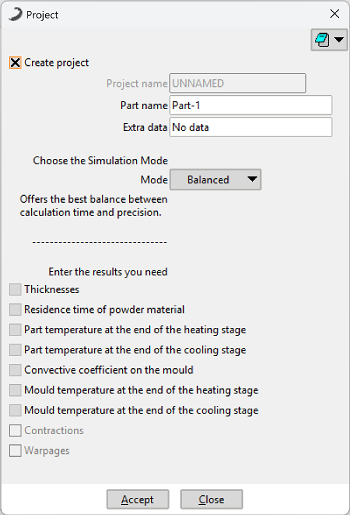 Figure 1: Define Project dialog window.
Project Name
Assign a unique name to identify your case study. To ensure compatibility with the solver and file management system, follow these naming conventions:
- Use alphanumeric characters and underscores (
_) only. - Prohibited: Do not use special characters such as
@, #, $, %, ñor accented letters (tildes).
Simulation Modes
Select the computational resolution level based on the analysis objective:
Operates with a reduced computational resolution and a larger time step to drastically accelerate the analysis. It provides a solid directional approximation, optimized for parameter exploration and rapid conceptual validation.
Implements a standard level of computational detail and an adaptive time step to achieve an optimal balance between computational cost and numerical reliability. This is the standard mode for production analysis and for obtaining verified results.
Maximizes computational granularity and uses the smallest possible time step to capture the system's dynamics in maximum detail. This computationally intensive mode of high numerical rigor is designed for final validation and generating definitive data with the highest confidence.
Note: Depending on the mesh size, calculation time may increase significantly.
Results Selection
Define which variables the solver will process for post-simulation analysis:
- Thickness
- Melt Fraction
- Part Temperatures
- Mould Temperatures
- Residence Time
It is the summation of time in each part of the mould that the powder material spent passing through. It provides a parameter of how the powder travels along the mould walls, allowing for a better understanding of the results obtained in thickness, melt fraction, and solidified fraction.